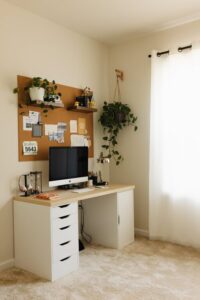

Creating a cozy and productive home office space is essential for anyone working or studying from home. A well-designed workspace can boost your focus, increase your efficiency, and make your workday more enjoyable. Whether you have a dedicated room or just a small corner, these tips will help you transform your space into a comfortable and effective work environment.
1. Choose the Right Location
Find a Quiet Spot
Look for a place with minimal distractions and good natural light. A quiet corner away from busy household activities is ideal.
Consider Privacy
If possible, select a location where you can close the door or create a visual boundary. This separation helps to signal “work time” to yourself and others.
2. Invest in Comfortable Furniture
Select an Ergonomic Chair
A supportive chair reduces strain on your back and neck, allowing you to work longer without discomfort.
Choose a Suitable Desk
Your desk should suit your body size and the type of work you do. It should be spacious enough to hold your computer and other essential items.
Add Footrests or Adjustable Stands
These can improve posture and overall comfort during long work sessions.
3. Optimize Lighting
Maximize Natural Light
Position your desk near a window if possible. Natural light helps reduce eye strain and improves mood.
Use Task Lighting
A good desk lamp with adjustable brightness can provide focused light for reading or detailed work.
Avoid Glare
Arrange screens and lighting to minimize glare on your computer, which can cause headaches and fatigue.
4. Personalize Your Space
Add Plants
Indoor plants bring life to your workspace and may improve air quality and reduce stress.
Incorporate Inspiring Décor
Use artwork, photos, or motivational quotes that uplift you without cluttering the space.
Choose Calming Colors
Soft, neutral tones create a cozy atmosphere, while brighter accents can stimulate creativity.
5. Keep Your Workspace Organized
Declutter Regularly
Remove unnecessary items to keep your desk tidy and free from distractions.
Use Storage Solutions
Shelves, drawers, or organizers help keep documents, tools, and supplies in order.
Develop a Filing System
Whether digital or physical, a simple filing system improves efficiency and reduces time spent searching for important papers.
6. Manage Technology Efficiently
Set Up Reliable Equipment
Ensure your computer, printer, and internet connection are functioning well to avoid interruptions.
Use Cable Management
Keep cords and cables organized with clips, ties, or tubes to prevent a messy appearance.
Select Comfortable Accessories
Consider an ergonomic keyboard, mouse, or even a standing desk converter to enhance comfort.
7. Create a Routine and Boundaries
Define Work Hours
Set specific start and end times to maintain balance between work and personal life.
Use Your Space Only for Work
Train your mind by reserving this area for work-related activities only.
Take Breaks
Regular breaks improve productivity and prevent burnout. Use your workspace to step away briefly and refresh.
8. Add Comfort Elements
Use Soft Textiles
Add cushions, a cozy rug, or a throw blanket to make your office inviting.
Control Temperature
Use fans, heaters, or blankets to maintain a comfortable temperature year-round.
Play Background Music
If it helps you focus, soft instrumental music or nature sounds can enhance your environment.
Conclusion
Designing a home office that feels cozy and promotes productivity doesn’t require a large budget or space. By carefully selecting your location, investing in comfortable furniture, optimizing lighting, and personalizing your environment, you can create a space that supports your work and well-being. Keep your area organized, manage technology smartly, and develop clear routines to maximize your success working from home. With these tips, your home office will become a place you look forward to spending time in every day.